Paying for Crystals: Cards, Wallets and Local Methods
Checkout on Genshin Impact accepts credit and debit cards, e-wallets and, in many regions, local payment methods, with the payment running over an encrypted channel and antifraud monitoring behind it. The 980+110 Genesis Crystal tier is published at $10.83 against a $14.99 list price. This page covers what the checkout takes, what the currency selector does and does not do, and how a bank conversion fee lands on a real order.

Key takeaways
- Cards, e-wallets and local payment methods are accepted, and payments run over encrypted channels with antifraud monitoring.
- Every price on the site is shown in US dollars, including on the language pages, with a currency selector in the header.
- If your bank bills you in another currency it may add its own conversion fee, and that charge comes from the bank rather than from the store.
- New users get one coupon with no threshold, published as 15% and valid 30 days.
What the checkout takes
The published payment list is short: credit and debit cards, e-wallets, and local payment methods in many regions. The Spanish page states that list most fully, which makes sense given it serves a wider set of local rails, and the same checkout serves the English and German pages. There is no separate wallet balance to load first — the payment happens in the checkout for the order you are placing.
What you need beyond the payment method is the account side of the order. On the Genshin page that means the email, password and server of your HoYoverse Account, with America, Europe, Asia and TW-HK-MO offered. Payment and credentials are collected in one flow, and the window starts when the details are complete.
Encrypted channels and antifraud monitoring, in plain terms
The pages describe payments as running over encrypted channels with antifraud monitoring switched on. Two practical points follow. First, encryption covers the transport of your card data; it does not change what the item costs. Second, antifraud monitoring can slow a first purchase while a new card is checked, which is worth knowing if you are buying against a banner deadline.
Neither of those is a promise about outcomes, and it is worth saying what the published protection actually is. The site publishes a Full Refund Guarantee: if an order is not delivered or cannot be used, you receive a full refund. That is the written commitment. Anything beyond it — a claim that nothing can go wrong — is not on the page, and I would not repeat it here.
USD on the page, your currency at the bank
Prices are displayed in US dollars. The German and Spanish pages show the same dollar amounts as the English one, and a selector in the header handles the display currency. The important distinction is between display and settlement: the selector changes what you read, while your bank decides what you are charged in and at which rate.
That is where a conversion fee can appear. If your card is billed in a currency other than USD, the bank may add its own conversion fee, and that charge comes from the bank rather than from the store. It is not a line in the published price, so it will not appear in the arithmetic below unless you add it yourself. If you want to know the exact figure, your card statement is the source.
The crystal ladder in one table
Four tiers show the published price pattern, with the difference calculated against the list price printed beside each one.
| Pack | KeyGold price | List price | Difference |
|---|---|---|---|
| 60 Genesis Crystals | $0.77 | $0.99 | $0.22 |
| 980+110 Genesis Crystals | $10.83 | $14.99 | $4.16 |
| 3280+600 Genesis Crystals | $36.12 | $49.99 | $13.87 |
| 6480+1600 Genesis Crystals | $74.99 | $99.99 | $25.00 |
The four differences run from $0.22 to $25.00, and the largest one belongs to the largest tier. Genesis Crystals convert to Primogems one for one, so a tier's label is also its crystal count. A single Wish costs 160 Primogems, which makes the 980+110 tier a little under seven Wishes once the bonus is included.
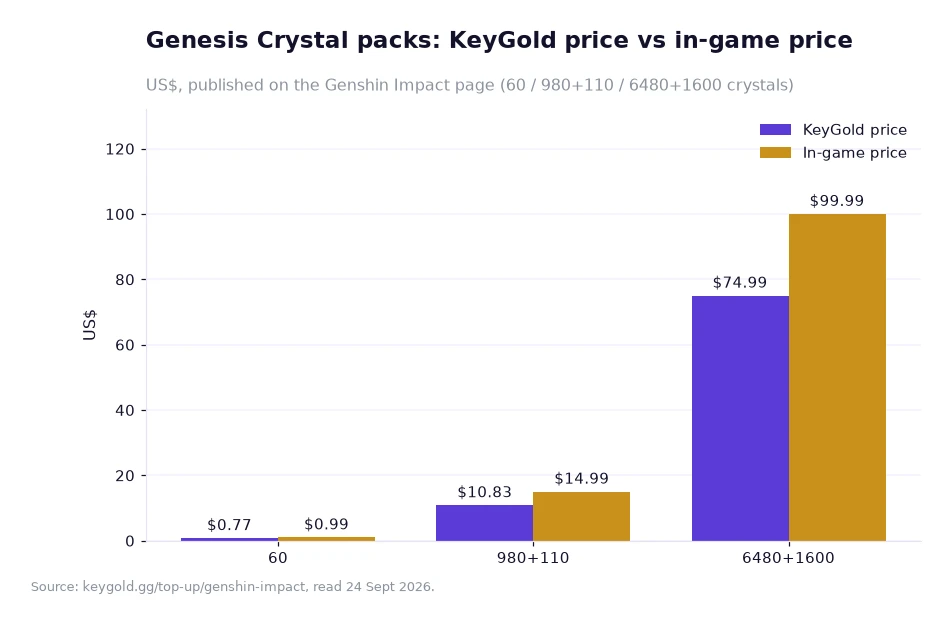
Reading the chart against your payment method
The chart uses three of the tiers from the table above and places the published price next to the in-game price. The gaps are $0.22, $4.16 and $25.00 respectively — the same three numbers, shown as paired bars rather than columns of text. Nothing about the chart depends on how you pay; the price pairs are the same whether the checkout takes a card, an e-wallet or a local method.
What does change with the payment method is everything that happens after the price. A local method may settle in your own currency without a conversion step. A card billed in another currency may pick up a fee. Same bar, different landing total.
Worked example: a bank fee on the middle tier
Take the 980+110 tier at the published $10.83, paid with a card that is billed in a currency other than USD. Assume, purely to show the arithmetic, that the bank adds a conversion charge of 3%; that percentage is my assumption, not a published rate, and your bank's own figure is the one that applies.
Step one, the published price: $10.83. Step two, the assumed fee: 10.83 × 0.03 = $0.32. Step three, the illustrative total: 10.83 + 0.32 = $11.15. Step four, compare that with the $14.99 list price: 14.99 − 11.15 = $3.84 still in your favour, so even a fee at that level leaves the published price below the reference price.
Step five, stretch it over a year. One 980+110 order a month is 12 × 10.83 = $129.96 at the published price, against 12 × 14.99 = $179.88 at list. The difference is 179.88 − 129.96 = $49.92, which is 49.92 / 179.88 = 27.8% below list. Add the illustrative 3% fee to every order and the yearly total becomes 129.96 + 12 × 0.32 = $133.80 — still $46.08 under the list figure. The fee matters, but on these numbers it does not erase the price difference.
Frequently asked questions
Which payment methods does the checkout accept?
The pages list credit and debit cards, e-wallets and local payment methods in many regions, with payments running over encrypted channels and antifraud monitoring.
Will I be charged in dollars?
Prices are shown in US dollars with a currency selector in the header. If your bank bills you in another currency it may add its own conversion fee.
Sorting the payment before the pack
Check three things in order: that the card or method you plan to use settles in a currency you accept, that the account credentials for the order are current, and that the tier you picked is the one you meant — 60, 980+110, 3280+600 or 6480+1600. Then pay, stay logged out of the game while the order is processed, and watch the Order Record rather than the game screen.
Genshin Impact orders are published at 5–30 minutes after payment, slower in the first hours of a new banner, and the page carries a 5.0 rating from 796 evaluations. Live chat is staffed 24/7 by a real person, before and after the purchase. Register before your first order and the new-user coupon is applied to your account: one coupon, no threshold, valid 30 days. If a payment question is blocking you, open the chat from the contact page; the help centre collects the account and payment questions, and the place to genshin top up cheap is the Genshin Impact page itself.
Payment methods, price pairs and delivery windows above come from KeyGold's own pages, read 24 Sept 2026; the conversion fee and yearly totals are the author's labelled example arithmetic on those published prices.[1]